Send RCS messages
Send RCS messages with Messente's Omnichannel API.
Introduction
RCS (Rich Communication Services) is a messaging protocol that enhances traditional SMS with rich media and provides a more interactive experience for the users. In addition to standard text messages, RCS supports media attachments, carousel cards, standalone cards, and suggested actions/replies. Using Omnichannel API, you can send RCS messages to engage your audience more effectively.
Simple RCS text message
Text messages are the most basic form of RCS communication. They allow you to send plain text content, just like traditional SMS.
- Python
- Node
- PHP
- Java
- Ruby
- .NET
- cURL
from pprint import pprint
from messente_api import (
    OmnimessageApi,
    Omnimessage,
    Configuration,
    ApiClient,
    Rcs,
    OmnimessageMessagesInner,
)
from messente_api.rest import ApiException


configuration = Configuration(
    username="YOUR_MESSENTE_API_USERNAME",
    password="YOUR_MESSENTE_API_PASSWORD",
)

api_instance = OmnimessageApi(ApiClient(configuration))

# Build the RCS message payload
rcs = Rcs(
    sender='<sender name (optional)>',
    text="hello, world!"
)
omnimessage = Omnimessage(
    to='<recipient_phone_number>',
    messages=[OmnimessageMessagesInner(rcs)],
)

try:
    # Send the omnimessage
    response = api_instance.send_omnimessage(omnimessage)
    print(
        "Successfully sent Omnimessage with id: %s that consists of the following messages:"
        % response.omnimessage_id
    )
    for message in response.messages:
        pprint(message)
except ApiException as exception:
    print("Exception while sending the Omnimessage: %s\n" % exception)
const MessenteApi = require("messente_api");

const defaultClient = MessenteApi.ApiClient.instance;
const basicAuth = defaultClient.authentications["basicAuth"];
basicAuth.username = "YOUR_MESSENTE_API_USERNAME";
basicAuth.password = "YOUR_MESSENTE_API_PASSWORD";

const api = new MessenteApi.OmnimessageApi();

const rcs = MessenteApi.Rcs.constructFromObject({
  sender: "<sender name (optional)>",
  text: "Hello, world!"
});

const omnimessage = MessenteApi.Omnimessage.constructFromObject({
  messages: [rcs],
  to: "<recipient_phone_number>",
});

api.sendOmnimessage(omnimessage, (error, data) => {
  if (error) {
    console.error(error);
  } else {
    console.log("API called successfully. Returned data: ", data);
  }
});
<?php

require_once(__DIR__ . '/vendor/autoload.php');

use Messente\Api\Api\OmnimessageApi;
use Messente\Api\Model\Omnimessage;
use Messente\Api\Configuration;
use Messente\Api\Model\Rcs;


$config = Configuration::getDefaultConfiguration()
    ->setUsername('YOUR_MESSENTE_API_USERNAME')
    ->setPassword('YOUR_MESSENTE_API_PASSWORD');

$apiInstance = new OmnimessageApi(
    new GuzzleHttp\Client(),
    $config
);

$rcs = new Rcs([
    'sender' => 'YOUR_SENDER_NAME (optional)',
    'text' => 'Hello, world!',
]);

$omnimessage = new Omnimessage([
    'to' => 'RECIPIENT_PHONE_NUMBER',
]);

$omnimessage->setMessages([$rcs]);

try {
    $result = $apiInstance->sendOmnimessage($omnimessage);
    print_r($result);
} catch (Exception $e) {
    echo 'Exception when calling sendOmnimessage: ', $e->getMessage(), PHP_EOL;
}
package org.example;

import com.messente.ApiClient;
import com.messente.ApiException;
import com.messente.api.*;
import com.messente.auth.HttpBasicAuth;

import java.util.List;


public class SendRcsTextMessage {
    public static void main(String[] args) {
        ApiClient apiClient = new ApiClient();
        OmnimessageApi apiInstance = new OmnimessageApi(apiClient);

        HttpBasicAuth basicAuth = (HttpBasicAuth) apiClient.getAuthentication("basicAuth");
        basicAuth.setUsername("YOUR_MESSENTE_API_USERNAME");
        basicAuth.setPassword("YOUR_MESSENTE_API_PASSWORD");

        Rcs rcs = new Rcs();
        rcs.setSender("<sender name(optional)>");
        rcs.setText("Hello, World!");

        OmnimessageMessagesInner rcsOmnimessageInner = new OmnimessageMessagesInner(rcs);
        rcsOmnimessageInner.setActualInstance(rcs);

        Omnimessage omnimessage = new Omnimessage();
        omnimessage.setMessages(List.of(rcsOmnimessageInner));
        omnimessage.setTo("<recipient_phone_number>");

        try {
            OmniMessageCreateSuccessResponse result = apiInstance.sendOmnimessage(omnimessage);
            System.out.println(result);
        } catch (ApiException e) {
            System.err.println(e.getResponseBody());
        }
    }
}
require 'messente_api'


MessenteApi.configure do |config|
  config.username = 'YOUR_MESSENTE_API_USERNAME'
  config.password = 'YOUR_MESSENTE_API_PASSWORD'
end

api_instance = MessenteApi::OmnimessageApi.new

text_message = MessenteApi::Rcs.new(
  sender: 'YOUR_SENDER_NAME (optional)',
  text: 'Hello, world!'
)

omnimessage = MessenteApi::Omnimessage.new(
  to: 'RECIPIENT_PHONE_NUMBER',
  messages: [text_message]
)

begin
  result = api_instance.send_omnimessage(omnimessage)
  puts result
rescue MessenteApi::ApiError => e
  puts "Exception when calling send_omnimessage: #{e}"
  puts e.response_body
end
using com.Messente.Api.Api;
using com.Messente.Api.Client;
using com.Messente.Api.Model;

namespace SendRcsTextMessageExample
{
    public class SendRcsTextMessageExample
    {
        public static void Main()
        {
            var conf = new Configuration
            {
                Username = "YOUR_MESSENTE_API_USERNAME",
                Password = "YOUR_MESSENTE_API_PASSWORD",
            };

            var apiInstance = new OmnimessageApi(conf);

            var rcs = new Rcs(
                sender: "YOUR_SENDER_NAME (optional)",
                text: "Hello, world!"
            );

            var rcsOmnimessageInner = new OmnimessageMessagesInner(rcs)
            {
                ActualInstance = rcs
            };

            var omnimessage = new Omnimessage(
                to: "RECIPIENT_PHONE_NUMBER",
                messages: new List<OmnimessageMessagesInner> { rcsOmnimessageInner }
            );

            try
            {
                var result = apiInstance.SendOmnimessage(omnimessage);
                Console.WriteLine(result.ToJson());
            }
            catch (Exception e)
            {
                Console.WriteLine("Exception when calling SendOmnimessage: " + e.Message);
            }
        }
    }
}
curl -X POST "https://api.messente.com/v1/omnimessage" \
  -u YOUR_MESSENTE_API_USERNAME:YOUR_MESSENTE_API_PASSWORD \
  -H "Content-Type: application/json" \
  -d '{
    "to": "<recipient_phone_number>",
    "messages": [
      {
        "channel": "rcs",
        "sender": "<sender name (optional)>",
        "text": "Hello, world!"
      }
    ]
  }'
RCS message with media content
Media messages allow you to send rich media content, such as images, videos, and audio files. When you send a message with media content, you must provide a publicly accessible URL for the content.
- Python
- Node
- PHP
- Java
- Ruby
- .NET
- cURL
from pprint import pprint
from messente_api import (
    OmnimessageApi,
    Omnimessage,
    Configuration,
    ApiClient,
    Rcs,
    OmnimessageMessagesInner,
    RcsContentInfo,
)
from messente_api.rest import ApiException


configuration = Configuration(
    username="YOUR_MESSENTE_API_USERNAME",
    password="YOUR_MESSENTE_API_PASSWORD",
)

api_instance = OmnimessageApi(ApiClient(configuration))

# Build the RCS message payload
rcs = Rcs(
    channel='rcs',
    sender='<sender name (optional)>',
    content_info=RcsContentInfo(
        file_url='<URL to a public media resource>',
        force_refresh=False
    )
)
omnimessage = Omnimessage(
    to='<recipient_phone_number>',
    messages=[OmnimessageMessagesInner(rcs)],
)

try:
    # Send the omnimessage
    response = api_instance.send_omnimessage(omnimessage)
    print(
        "Successfully sent Omnimessage with id: %s that consists of the following messages:"
        % response.omnimessage_id
    )
    for message in response.messages:
        pprint(message)
except ApiException as exception:
    print("Exception while sending the Omnimessage: %s\n" % exception)
const MessenteApi = require("messente_api");

const defaultClient = MessenteApi.ApiClient.instance;
const basicAuth = defaultClient.authentications["basicAuth"];
basicAuth.username = "YOUR_MESSENTE_API_USERNAME";
basicAuth.password = "YOUR_MESSENTE_API_PASSWORD";

const api = new MessenteApi.OmnimessageApi();

// Build the RCS message payload
const rcs = MessenteApi.Rcs.constructFromObject({
  sender: '<sender name (optional)>',
  content_info: MessenteApi.RcsContentInfo.constructFromObject({
    file_url: '<URL to a public media resource>',
    force_refresh: false
  })
});

const omnimessage = MessenteApi.Omnimessage.constructFromObject({
  to: '<recipient_phone_number>',
  messages: [rcs]
});

api.sendOmnimessage(omnimessage, (error, data) => {
  if (error) {
    console.error(error);
  } else {
    console.log("API called successfully. Returned data: ", data);
  }
});
<?php

require_once(__DIR__ . '/vendor/autoload.php');

use Messente\Api\Api\OmnimessageApi;
use Messente\Api\Model\Omnimessage;
use Messente\Api\Configuration;
use Messente\Api\Model\Rcs;
use Messente\Api\Model\RcsContentInfo;


$config = Configuration::getDefaultConfiguration()
    ->setUsername('YOUR_MESSENTE_API_USERNAME')
    ->setPassword('YOUR_MESSENTE_API_PASSWORD');

$apiInstance = new OmnimessageApi(
    new GuzzleHttp\Client(),
    $config
);

$rcs = new Rcs([
    'sender' => 'YOUR_SENDER_NAME (optional)',
    'contentInfo' => new RcsContentInfo([
        'fileUrl' => 'https://storage.googleapis.com/kitchen-sink-sample-images/cute-dog.jpg',
        'forceRefresh' => false
    ])
]);

$omnimessage = new Omnimessage([
    'to' => 'RECIPIENT_PHONE_NUMBER',
]);

$omnimessage->setMessages([$rcs]);

try {
    $result = $apiInstance->sendOmnimessage($omnimessage);
    print_r($result);
} catch (Exception $e) {
    echo 'Exception when calling sendOmnimessage: ', $e->getMessage(), PHP_EOL;
}
package org.example;

import com.messente.ApiClient;
import com.messente.ApiException;
import com.messente.api.*;
import com.messente.auth.HttpBasicAuth;

import java.util.List;


public class SendRcsMediaMessage {
    public static void main(String[] args) {
        ApiClient apiClient = new ApiClient();
        OmnimessageApi apiInstance = new OmnimessageApi(apiClient);

        HttpBasicAuth basicAuth = (HttpBasicAuth) apiClient.getAuthentication("basicAuth");
        basicAuth.setUsername("YOUR_MESSENTE_API_USERNAME");
        basicAuth.setPassword("YOUR_MESSENTE_API_PASSWORD");

        RcsContentInfo contentInfo = new RcsContentInfo();
        contentInfo.setFileUrl("https://storage.googleapis.com/kitchen-sink-sample-images/cute-dog.jpg");
        contentInfo.setForceRefresh(false);

        Rcs rcs = new Rcs();
        rcs.setSender("YOUR_SENDER_NAME (optional)");
        rcs.setContentInfo(contentInfo);

        OmnimessageMessagesInner rcsOmnimessageInner = new OmnimessageMessagesInner(rcs);
        rcsOmnimessageInner.setActualInstance(rcs);

        Omnimessage omnimessage = new Omnimessage();
        omnimessage.setMessages(List.of(rcsOmnimessageInner));
        omnimessage.setTo("RECIPIENT_PHONE_NUMBER");

        try {
            OmniMessageCreateSuccessResponse result = apiInstance.sendOmnimessage(omnimessage);
            System.out.println(result);
        } catch (ApiException e) {
            System.err.println(e.getResponseBody());
        }
    }
}
require 'messente_api'


MessenteApi.configure do |config|
  config.username = 'YOUR_MESSENTE_API_USERNAME'
  config.password = 'YOUR_MESSENTE_API_PASSWORD'
end

api_instance = MessenteApi::OmnimessageApi.new

media_message = MessenteApi::Rcs.new(
  channel: 'rcs',
  sender: 'YOUR_SENDER_NAME (optional)',
  content_info: MessenteApi::RcsContentInfo.new(
    file_url: 'https://storage.googleapis.com/kitchen-sink-sample-images/cute-dog.jpg',
    force_refresh: false
  )
)

omnimessage = MessenteApi::Omnimessage.new(
  to: 'RECIPIENT_PHONE_NUMBER',
  messages: [media_message]
)

begin
  result = api_instance.send_omnimessage(omnimessage)
  puts result
rescue MessenteApi::ApiError => e
  puts "Exception when calling send_omnimessage: #{e}"
  puts e.response_body
end
using com.Messente.Api.Api;
using com.Messente.Api.Client;
using com.Messente.Api.Model;

namespace SendRcsMediaMessageExample
{
    public class SendRcsMediaMessageExample
    {
        public static void Main()
        {
            var conf = new Configuration
            {
                Username = "YOUR_MESSENTE_API_USERNAME",
                Password = "YOUR_MESSENTE_API_PASSWORD",
            };

            var apiInstance = new OmnimessageApi(conf);

            var rcs = new Rcs(
                sender: "YOUR_SENDER_NAME (optional)",
                contentInfo: new RcsContentInfo(
                    fileUrl: "https://storage.googleapis.com/kitchen-sink-sample-images/cute-dog.jpg",
                    forceRefresh: false
                )
            );

            var rcsOmnimessageInner = new OmnimessageMessagesInner(rcs)
            {
                ActualInstance = rcs
            };

            var omnimessage = new Omnimessage(
                to: "RECIPIENT_PHONE_NUMBER",
                messages: new List<OmnimessageMessagesInner> { rcsOmnimessageInner }
            );

            try
            {
                var result = apiInstance.SendOmnimessage(omnimessage);
                Console.WriteLine(result.ToJson());
            }
            catch (Exception e)
            {
                Console.WriteLine("Exception when calling SendOmnimessage: " + e.Message);
            }
        }
    }
}
curl -X POST "https://api.messente.com/v1/omnimessage" \
  -u YOUR_MESSENTE_API_USERNAME:YOUR_MESSENTE_API_PASSWORD \
  -H "Content-Type: application/json" \
  -d '{
    "to": "<recipient_phone_number>",
    "messages": [
      {
        "channel": "rcs",
        "sender": "<sender name (optional)>",
        "content_info": {
          "file_url": "https://storage.googleapis.com/kitchen-sink-sample-images/cute-dog.jpg",
          "force_refresh": false
        }
      }
    ]
  }'
RCS message with a standalone card
Standalone cards allow you to send a single customized media item with an optional title, description, and suggested reply/action buttons.
- Python
- Node
- PHP
- Java
- Ruby
- .NET
- cURL
from pprint import pprint
from messente_api import (
    OmnimessageApi,
    Omnimessage,
    Configuration,
    ApiClient,
    Rcs,
    OmnimessageMessagesInner,
    RcsCardContent,
    RcsMedia,
    RcsContentInfo,
    RcsRichCard,
    RcsSuggestion,
    RcsSuggestedReply,
    RcsMediaHeight,
    RcsStandaloneCard,
    RcsCardOrientation,
    RcsImageAlignment,
)
from messente_api.rest import ApiException


configuration = Configuration(
    username="YOUR_MESSENTE_API_USERNAME",
    password="YOUR_MESSENTE_API_PASSWORD",
)

api_instance = OmnimessageApi(ApiClient(configuration))
card_content = RcsCardContent(
    title="Cute dog",
    description="Look at this cute dog. Would you like to hear more?",
    suggestions=[
        RcsSuggestion(
            reply=RcsSuggestedReply(
                text="🗒️ Tell me more",
                postback_data="card_1"
            )
        ),
        RcsSuggestion(
            reply=RcsSuggestedReply(
                text="🚫 Not interested",
                postback_data="card_1"
            )
        )
    ],
    media=RcsMedia(
        height=RcsMediaHeight.MEDIUM,
        content_info=RcsContentInfo(
            file_url="https://storage.googleapis.com/kitchen-sink-sample-images/cute-dog.jpg",
            force_refresh=False
        )
    )
)

standalone_card = RcsStandaloneCard(
    card_orientation=RcsCardOrientation.VERTICAL,
    thumbnail_image_alignment=RcsImageAlignment.LEFT,
    card_content=card_content,
)

rich_card = RcsRichCard(
    standalone_card=standalone_card,
)

rcs = Rcs(
    sender="YOUR_SENDER_NAME (optional)",
    rich_card=rich_card,
)

omnimessage = Omnimessage(
    to='RECIPIENT_PHONE_NUMBER',
    messages=[OmnimessageMessagesInner(rcs)],
)

try:
    # Send the omnimessage
    response = api_instance.send_omnimessage(omnimessage)
    print(
        "Successfully sent Omnimessage with id: %s that consists of the following messages:"
        % response.omnimessage_id
    )
    for message in response.messages:
        pprint(message)
except ApiException as exception:
    print("Exception while sending the Omnimessage: %s\n" % exception)
const MessenteApi = require("messente_api");

const defaultClient = MessenteApi.ApiClient.instance;
const basicAuth = defaultClient.authentications["basicAuth"];
basicAuth.username = "YOUR_MESSENTE_API_USERNAME";
basicAuth.password = "YOUR_MESSENTE_API_PASSWORD";

const api = new MessenteApi.OmnimessageApi();

const cardContent = MessenteApi.RcsCardContent.constructFromObject({
  title: "Cute dog",
  description: "Look at this cute dog. Would you like to hear more?",
  suggestions: [
    MessenteApi.RcsSuggestion.constructFromObject({
      reply: MessenteApi.RcsSuggestedReply.constructFromObject({
        text: "🗒️ Tell me more",
        postback_data: "card_1"
      })
    }),
    MessenteApi.RcsSuggestion.constructFromObject({
      reply: MessenteApi.RcsSuggestedReply.constructFromObject({
        text: "🚫 Not interested",
        postback_data: "card_1"
      })
    })
  ],
  media: MessenteApi.RcsMedia.constructFromObject({
    height: MessenteApi.RcsMediaHeight.MEDIUM,
    content_info: MessenteApi.RcsContentInfo.constructFromObject({
      file_url: "https://storage.googleapis.com/kitchen-sink-sample-images/cute-dog.jpg",
      force_refresh: false
    })
  })
});

const standaloneCard = MessenteApi.RcsStandaloneCard.constructFromObject({
  card_orientation: MessenteApi.RcsCardOrientation.VERTICAL,
  thumbnail_image_alignment: MessenteApi.RcsImageAlignment.LEFT,
  card_content: cardContent
});

const richCard = MessenteApi.RcsRichCard.constructFromObject({
  standalone_card: standaloneCard
});

const rcs = MessenteApi.Rcs.constructFromObject({
  sender: "YOUR_SENDER_NAME (optional)",
  rich_card: richCard
});

const omnimessage = MessenteApi.Omnimessage.constructFromObject({
  to: "RECIPIENT_PHONE_NUMBER",
  messages: [rcs]
});

api.sendOmnimessage(omnimessage, (error, data) => {
  if (error) {
    console.error(error);
  } else {
    console.log("API called successfully. Returned data: ", data);
  }
});
<?php

require_once(__DIR__ . '/vendor/autoload.php');

use Messente\Api\Api\OmnimessageApi;
use Messente\Api\Model\Omnimessage;
use Messente\Api\Configuration;
use Messente\Api\Model\Rcs;
use Messente\Api\Model\RcsCardContent;
use Messente\Api\Model\RcsMedia;
use Messente\Api\Model\RcsContentInfo;
use Messente\Api\Model\RcsRichCard;
use Messente\Api\Model\RcsSuggestion;
use Messente\Api\Model\RcsSuggestedReply;
use Messente\Api\Model\RcsMediaHeight;
use Messente\Api\Model\RcsStandaloneCard;
use Messente\Api\Model\RcsCardOrientation;
use Messente\Api\Model\RcsImageAlignment;

$config = Configuration::getDefaultConfiguration()
    ->setUsername('YOUR_MESSENTE_API_USERNAME')
    ->setPassword('YOUR_MESSENTE_API_PASSWORD');

$apiInstance = new OmnimessageApi(
    new GuzzleHttp\Client(),
    $config
);

$card_content = new RcsCardContent([
    'title' => 'Cute dog',
    'description' => 'Look at this cute dog. Would you like to hear more?',
    'suggestions' => [
        new RcsSuggestion([
            'reply' => new RcsSuggestedReply([
                'text' => '🗒️ Tell me more',
                'postbackData' => 'card_1'
            ])
        ]),
        new RcsSuggestion([
            'reply' => new RcsSuggestedReply([
                'text' => '🚫 Not interested',
                'postbackData' => 'card_1'
            ])
        ])
    ],
    'media' => new RcsMedia([
        'height' => RcsMediaHeight::MEDIUM,
        'contentInfo' => new RcsContentInfo([
            'fileUrl' => 'https://storage.googleapis.com/kitchen-sink-sample-images/cute-dog.jpg',
            'forceRefresh' => false
        ])
    ])
]);

$standalone_card = new RcsStandaloneCard([
    'cardOrientation' => RcsCardOrientation::VERTICAL,
    'thumbnailImageAlignment' => RcsImageAlignment::LEFT,
    'cardContent' => $card_content
]);

$rich_card = new RcsRichCard([
    'standaloneCard' => $standalone_card
]);

$rcs = new Rcs([
    'sender' => 'YOUR_SENDER_NAME (optional)',
    'richCard' => $rich_card
]);

$omnimessage = new Omnimessage([
    'to' => 'RECIPIENT_PHONE_NUMBER',
]);

$omnimessage->setMessages([$rcs]);

try {
    $result = $apiInstance->sendOmnimessage($omnimessage);
    print_r($result);
} catch (Exception $e) {
    echo 'Exception when calling sendOmnimessage: ', $e->getMessage(), PHP_EOL;
}
package org.example;

import com.messente.ApiClient;
import com.messente.ApiException;
import com.messente.api.*;
import com.messente.auth.HttpBasicAuth;

import java.util.List;


public class SendRcsRichCardStandalone {
    public static void main(String[] args) {
        ApiClient apiClient = new ApiClient();
        OmnimessageApi apiInstance = new OmnimessageApi(apiClient);

        HttpBasicAuth basicAuth = (HttpBasicAuth) apiClient.getAuthentication("basicAuth");
    basicAuth.setUsername("YOUR_MESSENTE_API_USERNAME");
    basicAuth.setPassword("YOUR_MESSENTE_API_PASSWORD");

        // Card
        RcsCardContent cardContent = new RcsCardContent();
        cardContent.setTitle("Cute dog");
        cardContent.setDescription("Look at this cute dog. Would you like to hear more?");

        RcsSuggestedReply reply1 = new RcsSuggestedReply();
        reply1.setText("🗒️ Tell me more");
        reply1.setPostbackData("card_1");

        RcsSuggestedReply reply2 = new RcsSuggestedReply();
        reply2.setText("🚫 Not interested");
        reply2.setPostbackData("card_1");

        RcsSuggestion suggestion1 = new RcsSuggestion();
        suggestion1.setReply(reply1);

        RcsSuggestion suggestion2 = new RcsSuggestion();
        suggestion2.setReply(reply2);
        cardContent.setSuggestions(List.of(suggestion1, suggestion2));

        RcsMedia media = new RcsMedia();
        media.setHeight(RcsMediaHeight.MEDIUM);

        RcsContentInfo contentInfo = new RcsContentInfo();
        contentInfo.setFileUrl("https://storage.googleapis.com/kitchen-sink-sample-images/cute-dog.jpg");
        contentInfo.setForceRefresh(false);
        media.setContentInfo(contentInfo);
        cardContent.setMedia(media);

        // Standalone card
        RcsStandaloneCard standaloneCard = new RcsStandaloneCard();
        standaloneCard.setCardOrientation(RcsCardOrientation.VERTICAL);
        standaloneCard.setThumbnailImageAlignment(RcsImageAlignment.LEFT);
        standaloneCard.setCardContent(cardContent);

        // Rich card
        RcsRichCard richCard = new RcsRichCard();
        richCard.setStandaloneCard(standaloneCard);

        // RCS message
        Rcs rcs = new Rcs();
    rcs.setSender("YOUR_SENDER_NAME (optional)");
        rcs.setRichCard(richCard);

        OmnimessageMessagesInner rcsOmnimessageInner = new OmnimessageMessagesInner(rcs);
        rcsOmnimessageInner.setActualInstance(rcs);

        Omnimessage omnimessage = new Omnimessage();
        omnimessage.setMessages(List.of(rcsOmnimessageInner));
    omnimessage.setTo("RECIPIENT_PHONE_NUMBER");

        try {
            OmniMessageCreateSuccessResponse result = apiInstance.sendOmnimessage(omnimessage);
            System.out.println(result);
        } catch (ApiException e) {
            System.err.println(e.getResponseBody());
        }
    }
}
require 'messente_api'


MessenteApi.configure do |config|
  config.username = 'YOUR_MESSENTE_API_USERNAME'
  config.password = 'YOUR_MESSENTE_API_PASSWORD'
end

api_instance = MessenteApi::OmnimessageApi.new

card_content = MessenteApi::RcsCardContent.new(
  title: 'Cute dog',
  description: 'Look at this cute dog. Would you like to hear more?',
  suggestions: [
    MessenteApi::RcsSuggestion.new(
      reply: MessenteApi::RcsSuggestedReply.new(
        text: '🗒️ Tell me more',
        postback_data: 'card_1'
      )
    ),
    MessenteApi::RcsSuggestion.new(
      reply: MessenteApi::RcsSuggestedReply.new(
        text: '🚫 Not interested',
        postback_data: 'card_1'
      )
    )
  ],
  media: MessenteApi::RcsMedia.new(
    height: MessenteApi::RcsMediaHeight::MEDIUM,
    content_info: MessenteApi::RcsContentInfo.new(
      file_url: 'https://storage.googleapis.com/kitchen-sink-sample-images/cute-dog.jpg',
      force_refresh: false
    )
  )
)

standalone_card = MessenteApi::RcsStandaloneCard.new(
  card_orientation: MessenteApi::RcsCardOrientation::VERTICAL,
  thumbnail_image_alignment: MessenteApi::RcsImageAlignment::LEFT,
  card_content: card_content
)

rich_card = MessenteApi::RcsRichCard.new(
  standalone_card: standalone_card
)

rcs_message = MessenteApi::Rcs.new(
  channel: 'rcs',
  sender: 'YOUR_SENDER_NAME (optional)',
  rich_card: rich_card
)

omnimessage = MessenteApi::Omnimessage.new(
  to: 'RECIPIENT_PHONE_NUMBER',
  messages: [rcs_message]
)

begin
  result = api_instance.send_omnimessage(omnimessage)
  puts result
rescue MessenteApi::ApiError => e
  puts "Exception when calling send_omnimessage: #{e}"
  puts e.response_body
end
using com.Messente.Api.Api;
using com.Messente.Api.Client;
using com.Messente.Api.Model;

namespace SendRcsRichCardStandaloneExample
{
    public class SendRcsRichCardStandaloneExample
    {
        public static void Main()
        {
            var conf = new Configuration
            {
                Username = "YOUR_MESSENTE_API_USERNAME",
                Password = "YOUR_MESSENTE_API_PASSWORD",
            };

            var apiInstance = new OmnimessageApi(conf);

            var cardContent = new RcsCardContent(
                title: "Cute dog",
                description: "Look at this cute dog. Would you like to hear more?",
                suggestions: new List<RcsSuggestion>
                {
                    new RcsSuggestion(
                        reply: new RcsSuggestedReply(
                            text: "🗒️ Tell me more",
                            postbackData: "card_1"
                        )
                    ),
                    new RcsSuggestion(
                        reply: new RcsSuggestedReply(
                            text: "🚫 Not interested",
                            postbackData: "card_1"
                        )
                    )
                },
                media: new RcsMedia(
                    height: RcsMediaHeight.MEDIUM,
                    contentInfo: new RcsContentInfo(
                        fileUrl: "https://storage.googleapis.com/kitchen-sink-sample-images/cute-dog.jpg",
                        forceRefresh: false
                    )
                )
            );

            var standaloneCard = new RcsStandaloneCard(
                cardOrientation: RcsCardOrientation.VERTICAL,
                thumbnailImageAlignment: RcsImageAlignment.LEFT,
                cardContent: cardContent
            );

            var richCard = new RcsRichCard(
                standaloneCard: standaloneCard
            );

            var rcs = new Rcs(
                sender: "YOUR_SENDER_NAME (optional)",
                richCard: richCard
            );

            var rcsOmnimessageInner = new OmnimessageMessagesInner(rcs)
            {
                ActualInstance = rcs
            };

            var omnimessage = new Omnimessage(
                to: "RECIPIENT_PHONE_NUMBER",
                messages: new List<OmnimessageMessagesInner> { rcsOmnimessageInner }
            );

            try
            {
                var result = apiInstance.SendOmnimessage(omnimessage);
                Console.WriteLine(result.ToJson());
            }
            catch (Exception e)
            {
                Console.WriteLine("Exception when calling SendOmnimessage: " + e.Message);
            }
        }
    }
}
curl -X POST "https://api.messente.com/v1/omnimessage" \
  -u YOUR_MESSENTE_API_USERNAME:YOUR_MESSENTE_API_PASSWORD \
  -H "Content-Type: application/json" \
  -d '{
    "to": "<recipient_phone_number>",
    "messages": [
      {
        "channel": "rcs",
        "sender": "<sender name (optional)>",
        "rich_card": {
          "standalone_card": {
            "card_orientation": "VERTICAL",
            "thumbnail_image_alignment": "LEFT",
            "card_content": {
              "title": "Cute dog",
              "description": "Look at this cute dog. Would you like to hear more?",
              "suggestions": [
                {
                  "reply": {
                    "text": "🗒️ Tell me more",
                    "postback_data": "card_1"
                  }
                },
                {
                  "reply": {
                    "text": "🚫 Not interested",
                    "postback_data": "card_1"
                  }
                }
              ],
              "media": {
                "height": "MEDIUM",
                "content_info": {
                  "file_url": "https://storage.googleapis.com/kitchen-sink-sample-images/cute-dog.jpg",
                  "force_refresh": false
                }
              }
            }
          }
        }
      }
    ]
  }'
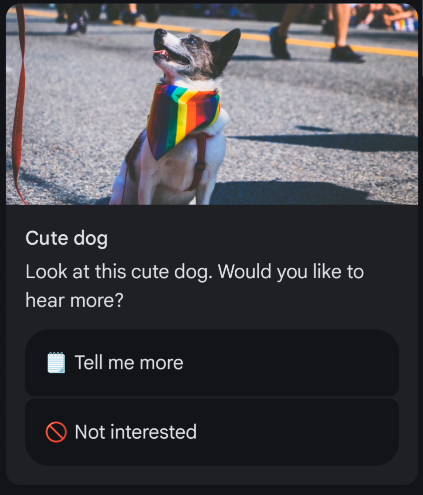
RCS Standalone Card Example
RCS message with a carousel card
Carousel cards allow you to send a list of items, which users can swipe through. Each item in the carousel can contain its own text, media, actions and suggestions. This example will create a carousel with two cards, each containing an image, title, description, and suggested replies.
- Python
- Node
- PHP
- Java
- Ruby
- .NET
- cURL
from pprint import pprint
from messente_api import (
    OmnimessageApi,
    Omnimessage,
    Configuration,
    ApiClient,
    Rcs,
    OmnimessageMessagesInner,
    RcsCardContent,
    RcsMedia,
    RcsContentInfo,
    RcsCarouselCard,
    RcsRichCard,
    RcsCardWidth,
    RcsSuggestion,
    RcsSuggestedReply,
    RcsMediaHeight,
)
from messente_api.rest import ApiException


configuration = Configuration(
    username="YOUR_MESSENTE_API_USERNAME",
    password="YOUR_MESSENTE_API_PASSWORD",
)

api_instance = OmnimessageApi(ApiClient(configuration))
card1 = RcsCardContent(
    title="Cute dog",
    description="This dog is very cute",
    suggestions=[
        RcsSuggestion(
            reply=RcsSuggestedReply(
                text="Card #1",
                postback_data="card_1"
            )
        )
    ],
    media=RcsMedia(
        height=RcsMediaHeight.MEDIUM,
        content_info=RcsContentInfo(
            file_url="https://storage.googleapis.com/kitchen-sink-sample-images/cute-dog.jpg",
            force_refresh=False
        )
    )
)

card2 = RcsCardContent(
    title="Cool elephant",
    description="This elephant is very cool",
    suggestions=[
        RcsSuggestion(
            reply=RcsSuggestedReply(
                text="Card #2",
                postback_data="card_2"
            )
        )
    ],
    media=RcsMedia(
        height=RcsMediaHeight.MEDIUM,
        content_info=RcsContentInfo(
            file_url="https://storage.googleapis.com/kitchen-sink-sample-images/elephant.jpg",
            force_refresh=False
        )
    )
)

carousel_card = RcsCarouselCard(
    card_width=RcsCardWidth.SMALL,
    card_contents=[card1, card2]
)

rich_card = RcsRichCard(
    carousel_card=carousel_card
)

rcs = Rcs(
    sender="<sender name (optional)>",
    rich_card=rich_card,
)

omnimessage = Omnimessage(
    to='<recipient_phone_number>',
    messages=[OmnimessageMessagesInner(rcs)],
)

try:
    # Send the omnimessage
    response = api_instance.send_omnimessage(omnimessage)
    print(
        "Successfully sent Omnimessage with id: %s that consists of the following messages:"
        % response.omnimessage_id
    )
    for message in response.messages:
        pprint(message)
except ApiException as exception:
    print("Exception while sending the Omnimessage: %s\n" % exception)
const MessenteApi = require("messente_api");

const defaultClient = MessenteApi.ApiClient.instance;
const basicAuth = defaultClient.authentications["basicAuth"];
basicAuth.username = "YOUR_MESSENTE_API_USERNAME";
basicAuth.password = "YOUR_MESSENTE_API_PASSWORD";

const api = new MessenteApi.OmnimessageApi();

const card1 = MessenteApi.RcsCardContent.constructFromObject({
  title: "Cute dog",
  description: "This dog is very cute",
  suggestions: [
    MessenteApi.RcsSuggestion.constructFromObject({
      reply: MessenteApi.RcsSuggestedReply.constructFromObject({
        text: "Card #1",
        postback_data: "card_1"
      })
    })
  ],
  media: MessenteApi.RcsMedia.constructFromObject({
    height: MessenteApi.RcsMediaHeight.MEDIUM,
    content_info: MessenteApi.RcsContentInfo.constructFromObject({
      file_url: "https://storage.googleapis.com/kitchen-sink-sample-images/cute-dog.jpg",
      force_refresh: false
    })
  })
});

const card2 = MessenteApi.RcsCardContent.constructFromObject({
  title: "Cool elephant",
  description: "This elephant is very cool",
  suggestions: [
    MessenteApi.RcsSuggestion.constructFromObject({
      reply: MessenteApi.RcsSuggestedReply.constructFromObject({
        text: "Card #2",
        postback_data: "card_2"
      })
    })
  ],
  media: MessenteApi.RcsMedia.constructFromObject({
    height: MessenteApi.RcsMediaHeight.MEDIUM,
    content_info: MessenteApi.RcsContentInfo.constructFromObject({
      file_url: "https://storage.googleapis.com/kitchen-sink-sample-images/elephant.jpg",
      force_refresh: false
    })
  })
});

const carouselCard = MessenteApi.RcsCarouselCard.constructFromObject({
  card_width: MessenteApi.RcsCardWidth.SMALL,
  card_contents: [card1, card2]
});

const richCard = MessenteApi.RcsRichCard.constructFromObject({
  carousel_card: carouselCard
});

const rcs = MessenteApi.Rcs.constructFromObject({
  sender: "<sender name (optional)>",
  rich_card: richCard
});

const omnimessage = MessenteApi.Omnimessage.constructFromObject({
  to: "<recipient_phone_number>",
  messages: [rcs]
});

api.sendOmnimessage(omnimessage, (error, data) => {
  if (error) {
    console.error(error);
  } else {
    console.log("API called successfully. Returned data: ", data);
  }
});
<?php

require_once(__DIR__ . '/vendor/autoload.php');

use Messente\Api\Api\OmnimessageApi;
use Messente\Api\Model\Omnimessage;
use Messente\Api\Configuration;
use Messente\Api\Model\Rcs;
use Messente\Api\Model\RcsCardContent;
use Messente\Api\Model\RcsMedia;
use Messente\Api\Model\RcsContentInfo;
use Messente\Api\Model\RcsRichCard;
use Messente\Api\Model\RcsSuggestion;
use Messente\Api\Model\RcsSuggestedReply;
use Messente\Api\Model\RcsMediaHeight;
use Messente\Api\Model\RcsCarouselCard;
use Messente\Api\Model\RcsCardWidth;

$config = Configuration::getDefaultConfiguration()
    ->setUsername('YOUR_MESSENTE_API_USERNAME')
    ->setPassword('YOUR_MESSENTE_API_PASSWORD');

$api_instance = new OmnimessageApi(
    new GuzzleHttp\Client(),
    $config
);

$card_1 = new RcsCardContent([
    'title' => 'Cute dog',
    'description' => 'This dog is very cute',
    'suggestions' => [
        new RcsSuggestion([
            'reply' => new RcsSuggestedReply([
                'text' => 'Card #1',
                'postbackData' => 'card_1'
            ])
        ])
    ],
    'media' => new RcsMedia([
        'height' => RcsMediaHeight::MEDIUM,
        'contentInfo' => new RcsContentInfo([
            'fileUrl' => 'https://storage.googleapis.com/kitchen-sink-sample-images/cute-dog.jpg',
            'forceRefresh' => false
        ])
    ])
]);

$card_2 = new RcsCardContent([
    'title' => 'Cool elephant',
    'description' => 'This elephant is very cool',
    'suggestions' => [
        new RcsSuggestion([
            'reply' => new RcsSuggestedReply([
                'text' => 'Card #2',
                'postbackData' => 'card_2'
            ])
        ])
    ],
    'media' => new RcsMedia([
        'height' => RcsMediaHeight::MEDIUM,
        'contentInfo' => new RcsContentInfo([
            'fileUrl' => 'https://storage.googleapis.com/kitchen-sink-sample-images/elephant.jpg',
            'forceRefresh' => false
        ])
    ])
]);

$carousel_card = new RcsCarouselCard([
    'cardWidth' => RcsCardWidth::SMALL,
    'cardContents' => [$card_1, $card_2]
]);

$rich_card = new RcsRichCard([
    'carouselCard' => $carousel_card
]);

$rcs = new Rcs([
    'sender' => 'YOUR_SENDER_NAME (optional)',
    'richCard' => $rich_card
]);

$omnimessage = new Omnimessage([
    'to' => 'RECIPIENT_PHONE_NUMBER',
]);

$omnimessage->setMessages([$rcs]);

try {
    $result = $api_instance->sendOmnimessage($omnimessage);
    print_r($result);
} catch (Exception $e) {
    echo 'Exception when calling sendOmnimessage: ', $e->getMessage(), PHP_EOL;
}
package org.example;

import com.messente.ApiClient;
import com.messente.ApiException;
import com.messente.api.*;
import com.messente.auth.HttpBasicAuth;

import java.util.List;


public class SendRcsRichCardCarousel {
    public static void main(String[] args) {
        ApiClient apiClient = new ApiClient();
        OmnimessageApi apiInstance = new OmnimessageApi(apiClient);

        HttpBasicAuth basicAuth = (HttpBasicAuth) apiClient.getAuthentication("basicAuth");
        basicAuth.setUsername("YOUR_MESSENTE_API_USERNAME");
        basicAuth.setPassword("YOUR_MESSENTE_API_PASSWORD");

        // Card 1
        RcsSuggestedReply reply1 = new RcsSuggestedReply();
        reply1.setText("Card #1");
        reply1.setPostbackData("card_1");

        RcsSuggestion suggestion1 = new RcsSuggestion();
        suggestion1.setReply(reply1);

        RcsCardContent card1 = new RcsCardContent();
        card1.setTitle("Cute dog");
        card1.setDescription("This dog is very cute");
        card1.setSuggestions(List.of(suggestion1));

        RcsContentInfo contentInfo1 = new RcsContentInfo();
        contentInfo1.setFileUrl("https://storage.googleapis.com/kitchen-sink-sample-images/cute-dog.jpg");
        contentInfo1.setForceRefresh(false);

        RcsMedia media1 = new RcsMedia();
        media1.setHeight(RcsMediaHeight.MEDIUM);
        media1.setContentInfo(contentInfo1);
        card1.setMedia(media1);

        // Card 2
        RcsSuggestedReply reply2 = new RcsSuggestedReply();
        reply2.setText("Card #2");
        reply2.setPostbackData("card_2");

        RcsSuggestion suggestion2 = new RcsSuggestion();
        suggestion2.setReply(reply2);

        RcsCardContent card2 = new RcsCardContent();
        card2.setTitle("Cool elephant");
        card2.setDescription("This elephant is very cool");
        card2.setSuggestions(List.of(suggestion2));

        RcsContentInfo contentInfo2 = new RcsContentInfo();
        contentInfo2.setFileUrl("https://storage.googleapis.com/kitchen-sink-sample-images/elephant.jpg");
        contentInfo2.setForceRefresh(false);

        RcsMedia media2 = new RcsMedia();
        media2.setHeight(RcsMediaHeight.MEDIUM);
        media2.setContentInfo(contentInfo2);
        card2.setMedia(media2);

        // Carousel
        RcsCarouselCard carouselCard = new RcsCarouselCard();
        carouselCard.setCardWidth(RcsCardWidth.SMALL);
        carouselCard.setCardContents(List.of(card1, card2));

        RcsRichCard richCard = new RcsRichCard();
        richCard.setCarouselCard(carouselCard);

        Rcs rcs = new Rcs();
        rcs.setSender("YOUR_SENDER_NAME (optional)");
        rcs.setRichCard(richCard);

        OmnimessageMessagesInner rcsOmnimessageInner = new OmnimessageMessagesInner(rcs);
        rcsOmnimessageInner.setActualInstance(rcs);

        Omnimessage omnimessage = new Omnimessage();
        omnimessage.setMessages(List.of(rcsOmnimessageInner));
        omnimessage.setTo("RECIPIENT_PHONE_NUMBER");

        try {
            OmniMessageCreateSuccessResponse result = apiInstance.sendOmnimessage(omnimessage);
            System.out.println(result);
        } catch (ApiException e) {
            System.err.println(e.getResponseBody());
        }
    }
}
require 'messente_api'


MessenteApi.configure do |config|
  config.username = 'YOUR_MESSENTE_API_USERNAME'
  config.password = 'YOUR_MESSENTE_API_PASSWORD'
end

api_instance = MessenteApi::OmnimessageApi.new

card_1 = MessenteApi::RcsCardContent.new(
  title: 'Cute dog',
  description: 'This dog is very cute',
  suggestions: [
    MessenteApi::RcsSuggestion.new(
      reply: MessenteApi::RcsSuggestedReply.new(
        text: 'Card #1',
        postback_data: 'card_1'
      )
    )
  ],
  media: MessenteApi::RcsMedia.new(
    height: MessenteApi::RcsMediaHeight::MEDIUM,
    content_info: MessenteApi::RcsContentInfo.new(
      file_url: 'https://storage.googleapis.com/kitchen-sink-sample-images/cute-dog.jpg',
      force_refresh: false
    )
  )
)

card_2 = MessenteApi::RcsCardContent.new(
  title: 'Cool elephant',
  description: 'This elephant is very cool',
  suggestions: [
    MessenteApi::RcsSuggestion.new(
      reply: MessenteApi::RcsSuggestedReply.new(
        text: 'Card #2',
        postback_data: 'card_2'
      )
    )
  ],
  media: MessenteApi::RcsMedia.new(
    height: MessenteApi::RcsMediaHeight::MEDIUM,
    content_info: MessenteApi::RcsContentInfo.new(
      file_url: 'https://storage.googleapis.com/kitchen-sink-sample-images/elephant.jpg',
      force_refresh: false
    )
  )
)

carousel_card = MessenteApi::RcsCarouselCard.new(
  card_width: MessenteApi::RcsCardWidth::SMALL,
  card_contents: [card_1, card_2]
)

rich_card = MessenteApi::RcsRichCard.new(
  carousel_card: carousel_card
)

rcs_message = MessenteApi::Rcs.new(
  channel: 'rcs',
  sender: 'YOUR_SENDER_NAME (optional)',
  rich_card: rich_card
)

omnimessage = MessenteApi::Omnimessage.new(
  to: 'RECIPIENT_PHONE_NUMBER',
  messages: [rcs_message]
)

begin
  result = api_instance.send_omnimessage(omnimessage)
  puts result
rescue MessenteApi::ApiError => e
  puts "Exception when calling send_omnimessage: #{e}"
  puts e.response_body
end
using com.Messente.Api.Api;
using com.Messente.Api.Client;
using com.Messente.Api.Model;

namespace SendRcsRichCardCarouselExample
{
    public class SendRcsRichCardCarouselExample
    {
        public static void Main()
        {
            var conf = new Configuration
            {
                Username = "YOUR_MESSENTE_API_USERNAME",
                Password = "YOUR_MESSENTE_API_PASSWORD",
            };

            var apiInstance = new OmnimessageApi(conf);

            var card1 = new RcsCardContent(
                title: "Cute dog",
                description: "This dog is very cute",
                suggestions: new List<RcsSuggestion>
                {
                    new RcsSuggestion(
                        reply: new RcsSuggestedReply(
                            text: "Card #1",
                            postbackData: "card_1"
                        )
                    )
                },
                media: new RcsMedia(
                    height: RcsMediaHeight.MEDIUM,
                    contentInfo: new RcsContentInfo(
                        fileUrl: "https://storage.googleapis.com/kitchen-sink-sample-images/cute-dog.jpg",
                        forceRefresh: false
                    )
                )
            );

            var card2 = new RcsCardContent(
                title: "Cool elephant",
                description: "This elephant is very cool",
                suggestions: new List<RcsSuggestion>
                {
                    new RcsSuggestion(
                        reply: new RcsSuggestedReply(
                            text: "Card #2",
                            postbackData: "card_2"
                        )
                    )
                },
                media: new RcsMedia(
                    height: RcsMediaHeight.MEDIUM,
                    contentInfo: new RcsContentInfo(
                        fileUrl: "https://storage.googleapis.com/kitchen-sink-sample-images/elephant.jpg",
                        forceRefresh: false
                    )
                )
            );

            var carouselCard = new RcsCarouselCard(
                cardWidth: RcsCardWidth.SMALL,
                cardContents: new List<RcsCardContent> { card1, card2 }
            );

            var richCard = new RcsRichCard(
                carouselCard: carouselCard
            );

            var rcs = new Rcs(
                sender: "YOUR_SENDER_NAME (optional)",
                richCard: richCard
            );

            var rcsOmnimessageInner = new OmnimessageMessagesInner(rcs)
            {
                ActualInstance = rcs
            };

            var omnimessage = new Omnimessage(
                to: "RECIPIENT_PHONE_NUMBER",
                messages: new List<OmnimessageMessagesInner> { rcsOmnimessageInner }
            );

            try
            {
                var result = apiInstance.SendOmnimessage(omnimessage);
                Console.WriteLine(result.ToJson());
            }
            catch (Exception e)
            {
                Console.WriteLine("Exception when calling SendOmnimessage: " + e.Message);
            }
        }
    }
}
curl -X POST "https://api.messente.com/v1/omnimessage" \
  -u YOUR_MESSENTE_API_USERNAME:YOUR_MESSENTE_API_PASSWORD \
  -H "Content-Type: application/json" \
  -d '{
    "to": "<recipient_phone_number>",
    "messages": [
      {
        "channel": "rcs",
        "sender": "<sender name (optional)>",
        "rich_card": {
          "carousel_card": {
            "card_width": "SMALL",
            "card_contents": [
              {
                "title": "Cute dog",
                "description": "This dog is very cute",
                "suggestions": [
                  {
                    "reply": {
                      "text": "Card #1",
                      "postback_data": "card_1"
                    }
                  }
                ],
                "media": {
                  "height": "MEDIUM",
                  "content_info": {
                    "file_url": "https://storage.googleapis.com/kitchen-sink-sample-images/cute-dog.jpg",
                    "force_refresh": false
                  }
                }
              },
              {
                "title": "Cool elephant",
                "description": "This elephant is very cool",
                "suggestions": [
                  {
                    "reply": {
                      "text": "Card #2",
                      "postback_data": "card_2"
                    }
                  }
                ],
                "media": {
                  "height": "MEDIUM",
                  "content_info": {
                    "file_url": "https://storage.googleapis.com/kitchen-sink-sample-images/elephant.jpg",
                    "force_refresh": false
                  }
                }
              }
            ]
          }
        }
      }
    ]
  }'
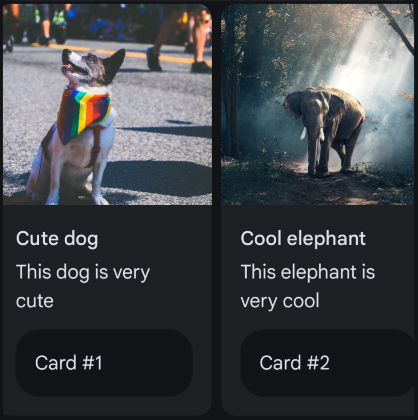
RCS Carousel Card Example